 |
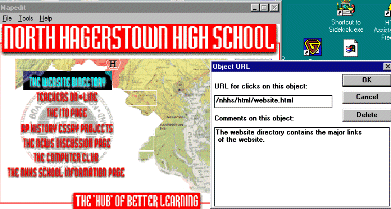
At left, an imagemap
|
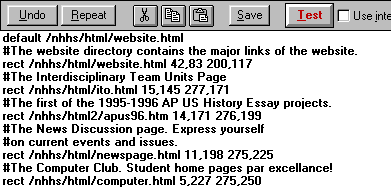 |
The imagemap's
|
|
At left, an imagemap
|
|
The imagemap's
|
The syntax for the URL that points to the script that runs the imagemap
might look something like the following:
<a href="/cgi-bin/imagemap/nhhs/cgi-bin/main.map"> <img align=center border=0 SRC="newnorth.gif" ISMAP alt="Imagemap: A photo of North High and map of Maryland with key links of the NHHS Website. The links are also listed below."></a>Here we see a partial URL pointing first to the CGI directory of the ISP, where there is a subdirectory for the imagemap interpreter. Then the path to the map file is added (/nhhs/cgi-bin/main.map). Then the image source for the image is listed (newnorth.gif), and then the tag that tells the browser that it is looking at an imagemap, that of ISMAP. An alt tag is given for non-graphical browsers. Again, inquire with your server administrator to locate the cgi-bin's imagemap interpreter and to activate your own cgi-bin directory.
For browsers such a Netscape 2.0 or later and Internet Explorer 3.0 or later, one can be released from the requirement of going through the ISP server for an imagemap effect. Using something known as the "client-side" imagemap, one can even use Mapedit to develop a map file, but instead of the ISMAP tag, one uses the USEMAP tag along with code that might look like the following:
The resulting code will have the following effect:This is an example of a client-side image map[3]
<h2>This is an example of a client-side image map.</h2> <MAP NAME="menu"> <AREA SHAPE="RECT" COORDS="0,0,99,49" HREF="Item1.htm"> <AREA SHAPE="RECT" COORDS="100,0,200,49" HREF="Item2.htm"> <AREA SHAPE="RECT" COORDS="200,0,299,49" HREF="Item3.htm"> </MAP> <IMG SRC="menu.gif" USEMAP="#menu">

One great resource for easy to configure scripts is Matt's Script Archive. All Matt asks is that you give him credit on your guestbook page. To see a guestbook in action, please visit and sign North High's guestbook!

Animated graphics have taken the web by storm. They are often mistaken for Java applets, but they do not require the programming skills called for by Java. Using any image editor such as Paint Shop Pro, one can develop a series of original GIF files, and by using a wonderful program called GIF Construction Set, one can save all the individual image files as one file known as a GIF89a. Voila! Animated graphics on your school's web pages!
There are many artists sharing their animated art so you won't
have to create any. But part of the challenge of webmastering is the generation
of creativity within oneself and one's students. Besides, posting original
art on one's website is always better than transferring data from someone
else's (IMHO). No, I did not develop the image you see here (sorry!)
Tables are the saving grace of web design because they are often
used to align images and text without the viewer knowing it. Almost all
professional websites consist of a conglomeration of images and text that
has been arranged by the use of tables. The webmasters add the attribute
border=0 within their table syntax and the outline of the table
becomes invisible (this ca n be done with images as well in order to remove
the hypergraphical blue border that surrounds clickable images). A
simple table can be seen below since one has been set up as the navigational
table for this web page.
To see the borderless table in action, one from my own personal
page will be recreated here. First you will see the HTML code, and then
the resulting image alignment as it appears on my own page:
<table width=132 border=0><tr><td><table width=133 border=0 cellpadding=0 cellspacing=0><tr><td valign=center><IMG SRC="/nhhs/gif/geoben.gif"></tr><tr><td valign=center><IMG SRC="/nhhs/gif/lilgeo.gif"><IMG SRC="/nhhs/gif/lilben.gif"></td></tr></table></td><td><table border=0><tr><td><IMG SRC="/nhhs/gif/thoughts.gif"></td></tr> </table><td><tr></table><hr>
|
|
For comments on what makes for good HTML and examples of school website ideas, click on this link, and take a look.
Since the advent of broadband internet technology, large amounts of data can now be moved over the web in much shorter amounts of time. This improved technology allows schools to create their own video content, complete with audio, as well as Flash modules that increase the level of interactivity of a website. Once your web design team begins moving into this level, a higher level of computer programming is called for to develop the kinds of professional pages you might find elsewhere on the web. Macromedia Flash is a versatile yet expensive tool for developing such a level of interactivity and animation for your school's website. The program works like film-editing software in that the palette is a timeline of events in an animation. Your design team will have to be strong in JavaScript commands and graphic design to develop websites that have both educational value as well as aesthetic appeal. Adobe has posted an article on this topic on their website.
 To Table of Contents
 Getting
The Word Out: "If you build it, they will come."
Getting
The Word Out: "If you build it, they will come."|
Teachers: |
[Lesson Plan of the Day] [Cassutto Memorial] [About the Author] [Search] [Internet Pocket Guide]